

Short answer: GitOps is a way to manage your infrastructure and apps using Git as the single source of truth. You write what you want in Git. A tool makes your system match it. No manual work is involved.
If you keep wondering what GitOps is, you are not alone. The word itself feels heavy, but the idea is simple. In this article, we explain it in simple terms, how it works, and when you really need it.
What Is GitOps: Basics
Take Git as a notebook where your team writes down the infrastructure of your system. It holds your servers, settings, and app versions. Every change is saved with a name, a time, and a reason.
GitOps adds one more step. A tool watches that notebook all the time. If your live system does not match the notebook, the tool fixes it.
This is the whole concept. Git says what should be running, and the tool makes sure it is.
How GitOps Works in 4 Steps
- Write and edit the config file in Git.
- Review it. Your team checks the change in a pull request.
- A GitOps tool notices. Tools like Argo CD or Flux watch your Git repository.
- The system updates itself. The tool compares Git with the live cluster and fixes any differences.
Thus, rollback is easy. If something breaks, you go back to the last good commit in Git.
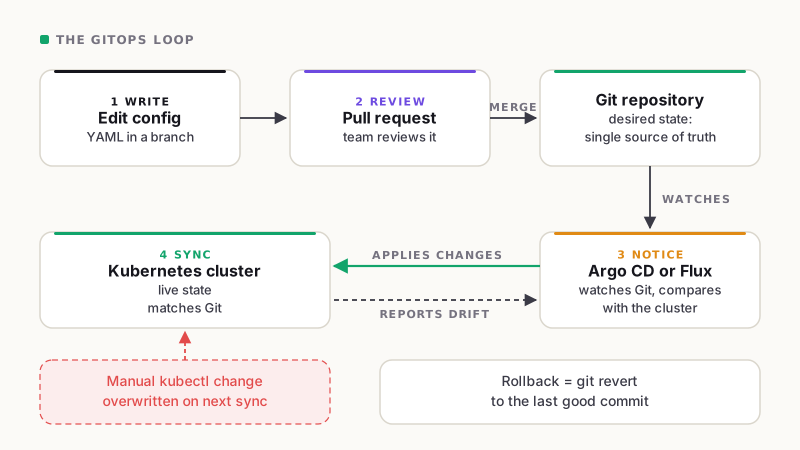
The four steps as a loop. Git always wins.
The Problem GitOps Solves: Manual Changes
Here is the true motivation behind why teams implement GitOps:
Imagine something falls in production late at night. An engineer connects to the cluster and changes a setting by hand. If it works, then everyone goes to sleep.
After some weeks, nobody remembers that change. It is not in Git, not in a ticket, and not in any document. The next deployment overwrites it, or the system breaks again, and no one knows why.
My rule is simple: if you are running on Kubernetes, GitOps is mandatory. Without it, you will not be able to track manual changes.
Kubernetes has many parts, and people can change them in different ways. Without GitOps, you can not get answers to “Who changed this?”, “When?”, and “Why?”. With GitOps, the answers can be found in the history of Git.
Key Benefits of GitOps
- Full history: every change is recorded, so you know who did what and when.
- Fewer mistakes: changes go through automatic review before they go live.
- Easy rollback: undo a bad change by reverting a commit.
- Less configuration drift: the tool keeps the live system matching Git, so nobody can quietly change things by hand.
- Better security: you give access to Git, not directly to the cluster.
- Faster delivery: developers are already well-versed in Git, making it their go-to tool for version control.
GitOps vs DevOps
They are not opponents. DevOps is a way for developers and operations teams to work together. GitOps is a method used within DevOps that helps your team deploy applications clearly and safely.
Is GitOps Only for Kubernetes?
No, GitOps can work with other systems as well, but Kubernetes and GitOps are like besties. Kubernetes uses files to define how things should run, making it a good fit for GitOps. If you use Kubernetes in production, GitOps is essential, not optional.
Popular GitOps Tools
Now that you know what is GitOps, the next question is which tool to use. These two are the most common:
- Argo CD: easy to use, with a clear dashboard that shows what is in sync.
- Flux: lightweight and flexible, and a good fit for teams who prefer working from the command line.
Both are open source and work well on cloud platforms like AWS EKS and Google GKE.
How to Get Started With GitOps
- Keep all your Kubernetes files in one Git repository.
- Use pull requests so every change gets reviewed.
- Pick a tool such as Argo CD or Flux and connect it to your repository.
- Turn on automatic syncing for one small app first.
- Block manual changes to the cluster once your team is comfortable.
- Start small, and move one app at a time.
FAQs
What is GitOps used for?
It is used to deploy and manage infrastructure as code and apps from Git, so every change is tracked, reviewed, and reversible.
Is GitOps the same as CI/CD?
No, CI/CD is responsible for building and testing your code. GitOps manages the deployment of the final changes to your cluster and ensures it remains in the correct state. Together, they complement each other effectively.
Do small teams need GitOps?
Yes, if you run Kubernetes. Even a small team can lose track of manual changes fast.
Which is better, Argo CD or Flux?
Both work well. Argo CD is easier for beginners because of its dashboard. Flux suits teams who prefer a lighter setup.
Conclusion
You can take it as a simple rule: if it is not in Git, it does not exist. Every change is written down, reviewed, and applied by a tool, not by hand. For teams on Kubernetes, that is the only reliable way to stay in control.
Want help setting up GitOps on your cluster? Book a free 30-minute cloud architecture review with the Cloud Solitaire team. We will look at your setup and show you where manual changes may be hiding.