
AWS bills rarely make up a big list because of a few big mistakes. They grow through small defaults: a NAT gateway carrying S3 traffic, dev clusters running all weekend, and instances sized for a peak that never came. All of this is fixable. If you want to reduce your AWS bill without slowing your systems, these 10 practices are the place to start. They come from the cost optimization work we do for our clients at Cloud Solitaire.
Quick answer: One of the fastest ways to reduce your AWS bill is to use free S3 and DynamoDB gateway endpoints, run lower environments on Spot Instances, shut them down at night, right-size compute, cut cross-AZ traffic, and commit to Savings Plans or Reserved Instances for steady workloads.
1. Use S3 gateway and DynamoDB gateway endpoints
Traffic from private subnets to S3 and DynamoDB usually goes through a NAT gateway. It charges for every GB it processes. Gateway endpoints for these two services have no hourly or data processing charge. Adding one only requires changing the route table, and it can quickly improve performance for data-heavy workloads.
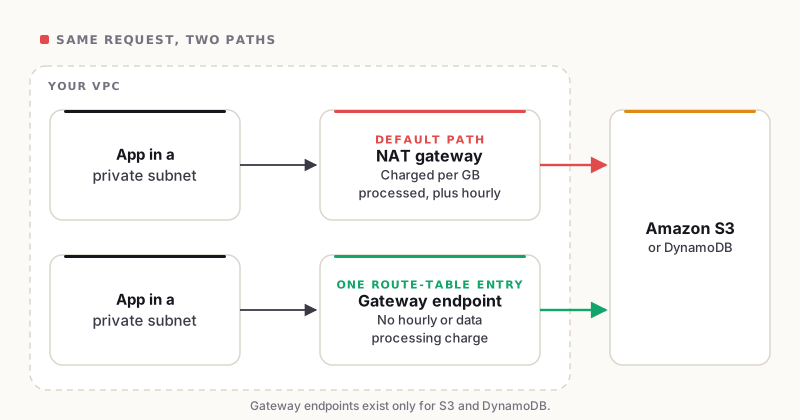
The same S3 request, two paths: only one of them is billed per GB.
2. Use Spot Instances in lower environments
Spot Instances can cost up to 90% less than On-Demand prices. AWS can take these instances back at any time, so they work well for development, testing, CI tasks, and batch jobs. For critical production workloads, use On-Demand instances or reserved capacity.
3. Right-size CPU and memory based on actual usage
Teams often choose instance sizes for the highest workload and never adjust them later. First, review several weeks of CPU and memory utilization by using CloudWatch and AWS Compute Optimizer, then move to a smaller or better-matched instance type. Memory metrics require the CloudWatch agent, so enable it first. Avoid guessing; right-size to reduce your AWS bill.
4. Reduce cross-AZ traffic
Cross-AZ traffic within a region costs $0.01 per GB in each direction. This cost is easy to miss because it doesn’t show up in architecture diagrams. Keep services that communicate frequently in the same AZ when possible, and use topology-aware routing in Kubernetes to keep traffic local. Don’t sacrifice multi-AZ availability in production just to save money. The goal is to keep traffic local while maintaining redundancy.
5. Use a pull-through cache for Docker images
Every node that pulls images from a public registry via a NAT gateway adds data processing charges. Amazon ECR’s pull-through cache saves a copy of upstream images in your private registry. With VPC endpoints in place, later pulls stay on the AWS network instead of crossing the NAT gateway. It also speeds up deployments and helps you avoid public registry rate limits.
6. Shut down lower environments at night
On weekdays, dev and staging environments are used about ten hours a day, which is roughly 30% of the hours in a week. Shutting them down at night and on weekends can cut their compute hours by around 70%. You can use AWS Instance Scheduler, cron scripts, or autoscaling to zero. Turning off development and testing environments when not in use is an easy way to cut AWS costs without affecting anyone.
7. Self-host services where it makes sense
Managed services such as Amazon OpenSearch Service, managed Prometheus, and managed Grafana are convenient but expensive at scale. In our experience, self-hosting these tools generally works well, and the returns are large. The catch is that it requires real expertise, because you own upgrades, backups, scaling, and on-call. Self-hosting can reduce your AWS bill significantly if your team, or your cloud partner, has the skills to run it.
8. Monitor cross-AZ traffic continuously
You can’t fix anything unless you see it. In Cost Explorer, group costs by usage type and check DataTransfer-Regional-Bytes. Use VPC Flow Logs and cost tags to find which services are generating the traffic. Set alerts to catch sudden cost increases early instead of waiting until the end of the month.
9. Use Savings Plans
A Savings Plan is a 1- or 3-year commitment to a certain hourly spend, in exchange for discounts of up to 72% (EC2 Instance Savings Plans) or up to 66% (Compute Savings Plans) versus On-Demand pricing. Compute Savings Plans offer discounts across different instance types, regions, Fargate, and Lambda. This flexibility makes it the simplest way to reduce your AWS bill on a steady compute.
10. Use Reserved Instances where they still fit
Reserved Instances can offer discounts of up to 72% for specific, predictable configurations. They are worth evaluating for database and caching services such as RDS, ElastiCache, and OpenSearch. To avoid overlapping commitments, check your current Savings Plans eligibility first.
Where to start
To reduce your AWS bill efficiently and in the right order, start with the low-risk, low-effort changes: gateway endpoints, night-time shutdowns, and Spot in lower environments. Then rightsize and fix cross-AZ traffic. And once your usage is lean and stable, make your Savings Plans and Reserved Instance commitments last. Committing before rightsizing locks in waste.
FAQs
How do you reduce your AWS bill without risking uptime? Apply changes that don’t touch production availability: lower-environment scheduling, Spot in dev and staging, and gateway endpoints. By putting monitoring in place, make production changes gradually.
How much can Spot Instances save? Up to 90% compared to On-Demand prices. The savings vary by instance type and region.
Is self-hosting always cheaper than managed AWS services? No. Self-hosting saves money on costly tools like OpenSearch, Prometheus, and Grafana, but only if your team can run them reliably. Otherwise, the extra work can cost more than the savings.
Conclusion
These steps collectively help to reduce your AWS bill by minimizing waste in compute resources, networking, and commitments, while ensuring production remains reliable.
Ready to reduce your AWS bill? Book Your Free Consultation Today!