

Many startups begin with Docker Compose. You write one file, run one command, and your entire app starts. But as apps grow, more users arrive, more services get added, and one day someone asks: “Have we outgrown Docker Compose?”
This article tells you 7 clear signs to answer that question. It also helps you know when Kubernetes isn’t necessary.
Comparison Between Docker Compose and Kubernetes
Docker Compose runs many containers together on one machine. It is great for local development, testing, and small apps on a single server.
Kubernetes (K8s) is a container orchestrator. It runs your containers across multiple machines and keeps them healthy, up to date, and scaled.
| Docker Compose | Kubernetes | |
|---|---|---|
| Runs on | One server | Many servers (a cluster) |
| Setup | Very easy | Harder, but managed services help |
| Auto-scaling | No | Yes |
| Self-healing | Basic restarts only | Yes, across servers |
| Best for | Dev, testing, small apps | Growing production apps |
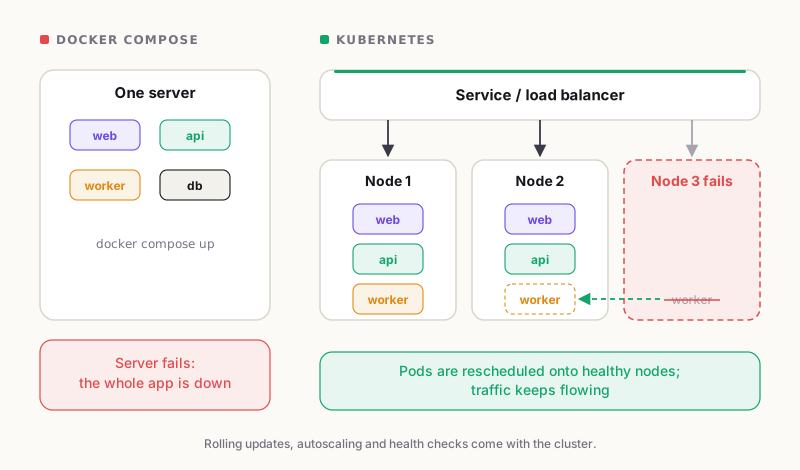
One server versus a cluster: what happens when a machine fails.
7 Signs You Have Outgrown Docker Compose
1. One server is no longer enough
Docker Compose is built for a single host. If that server fails, your whole app goes down. If your business cannot afford that risk, you have outgrown Docker Compose.
Kubernetes lets you spread your containers across multiple servers. If one server dies, it moves your containers to another one.
2. Every deployment causes downtime
With Docker Compose, to update apps, you have to stop the old container and start a new one. Users may see errors during that gap.
Kubernetes uses rolling updates. It starts new containers, checks their health, and removes the old ones only when the new ones are ready. Your users would never notice.
3. You scale by hand
Usually, traffic goes up on sales day and down at night. Docker Compose adds or removes containers manually, and you are limited to one machine.
Kubernetes allows you to scale up and down based on CPU, memory, or other signals. This is called autoscaling, which will save you time and money.
4. Someone has to fix crashes at night
Docker Compose can restart a crashed container on the same server. But it will not replace an unhealthy one, move your app to a new server, or hold back traffic until a container is ready.
Kubernetes has smart health checks. It checks whether each container is alive and ready, and when something breaks, it replaces it automatically.
5. You have too many microservices, and they talk to each other too much
Your Docker Compose file starts with 4 services but grows to 40, with multiple teams editing it. Therefore, deployments start clashing, and nobody feels safe. A huge, shared file is a clear sign you have outgrown Docker Compose.
The bigger problem is services depending on each other. One slow or failed service can break the entire chain. Docker Compose lacks built-in retries, traffic control, and request tracing.
Kubernetes solves this with service discovery, load balancing, and namespaces. Add Istio or Linkerd for advanced features like retries, timeouts, encryption, and tracing.
6. Security and access control are getting hard
Controlling is required when your company grows. Docker Compose lacks a system for role-based access. Secrets are often kept in plain files.
Kubernetes has role-based access control (RBAC), built-in secrets, and network policies. These help you pass audits and keep customer data safe.
7. You write more scripts than features
Observe and analyse your team’s tools. If you need bash scripts to deploy apps, cron jobs to restart them, and custom tools to check if they’re working, your setup has become too complicated. Hence, it’s a clear sign that you have outgrown Docker Compose.
How Many Signs Is Enough?
Use this simple rule of thumb:
- 1–2 signs: Stay with Compose. Fix the pain points first.
- 3–4 signs: Start planning your move to Kubernetes.
- 5 or more signs: You have likely outgrown Docker Compose, and waiting will cost you more.
When Kubernetes Is Not the Answer (Yet)
Kubernetes is powerful, but it is not free. It adds cost, plus you need a trained team to operate it. You may not need it if:
- Your team is small, and your app runs well on one server
- Your traffic is steady, and downtime is okay
- You have not checked simpler options like Docker Swarm or a managed service such as AWS ECS
Before you decide you have outgrown Docker Compose, make sure the problem is real. Read our article on when Kubernetes is overkill to avoid moving too early.
How to Move From Docker Compose to Kubernetes
- List your services. Write down every container, port, volume, and setting.
- Move your data out. Instead of a container volume, use a managed database.
- Convert one service at a time. In Kubernetes, each Compose service is set up as a Deployment and a Service. Environment variables go into ConfigMaps and Secrets. Tools like Kompose can create a basic version, but always review it.
- Add health checks and resource limits. Kubernetes needs them to work properly.
- Choose managed Kubernetes. Amazon EKS, Google GKE, or Azure AKS take care of the hard parts.
- Test, then switch traffic. Keep a rollback plan ready.
Frequently Asked Questions
Is Docker Compose good for production?
Yes, for small apps on a single server. It is not enough when you need high availability, autoscaling, or zero-downtime deployments.
Can Docker Compose scale?
Only on a single machine. To scale across multiple servers, you need an orchestrator like Kubernetes.
Is Kubernetes hard to learn?
It can be. Managed services and an experienced partner make it much easier.
Have we outgrown Docker Compose if we only run a few containers?
Not always. The number of containers matters less than your needs: uptime, scale, and team size.
Final Thoughts
Docker Compose is great for initial setup. If downtime, manual scaling, and late-night fixes are becoming common, it’s probably time to move beyond Docker Compose.
Moving to Kubernetes at the right time allows you to gain reliability, easy scaling, and a calmer team. Moving too early wastes money. Not sure which side you are on? Cloud Solitaire helps teams move to Kubernetes on AWS.
Book a free 30-minute cloud architecture review with Cloud Solitaire and find out if you have outgrown Docker Compose.