

Choosing between EKS Standard vs EKS Auto Mode raises the question: who is running your cluster? If a skilled platform team configures it, EKS Standard is usually the better and cheaper choice. EKS Auto Mode manages your nodes, but AWS charges an extra management fee of about 12% of the instance price, in addition to regular EC2 costs. This article compares both options on cost, control, and operations, including a cost table for a 10-node cluster.
Short Answers: EKS Standard vs EKS Auto Mode
Choose EKS Standard when an experienced team (in-house or a partner) will configure and run the cluster. You get full control over nodes, AMIs, instance types, and purchase options. You can avoid the Auto Mode premium.
Choose EKS Auto Mode when you don’t have dedicated platform engineers, run standard workloads, and value speed over cost. AWS handles node operation for you, but you have to pay more per node.
What is EKS Standard?
In EKS Standard, AWS manages the Kubernetes control plane, while the team manages the worker nodes. Your team chooses between managed node groups, self-managed nodes, or Karpenter. It also owns Amazon Machine Images (AMIs), core add-ons, node upgrades, scaling policies, and security hardening.
Therefore, more work, but completely flexible. You decide which instance families to run, how to mix On-Demand and Spot capacity, and when to upgrade.
What is EKS Auto Mode?
Amazon EKS Auto Mode lets AWS manage more of the data plane. AWS handles node provisioning, scaling, patching, and Kubernetes version upgrades. Nodes use Bottlerocket, a container-focused OS, with built-in storage and load-balancing features. The trade-off is less control.
You have limited access to nodes and can’t use custom AMIs. Custom needs, like special kernel modules or unusual software, may not work with the standard setup.
EKS standard vs EKS Auto Mode: key differences
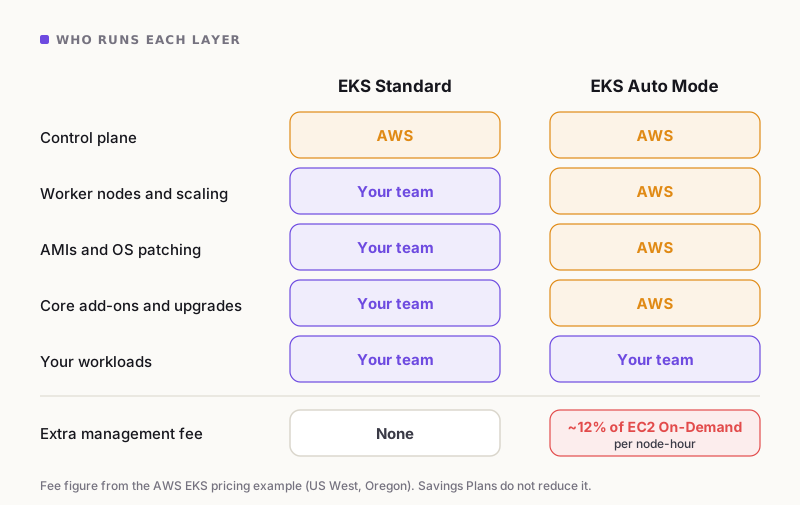
Who runs each layer in EKS Standard and EKS Auto Mode.
| Area | EKS standard | EKS Auto Mode |
|---|---|---|
| Control plane | Managed by AWS | Managed by AWS |
| Worker nodes | Managed by your team | Managed by AWS |
| Custom AMIs and node tuning | Fully supported | Not supported |
| Add-ons and upgrades | Your responsibility | Largely handled by AWS |
| Extra management fee | None | Per instance-hour, about 12% of EC2 On-Demand price |
| Best for | Teams with Kubernetes expertise | Small teams, standard workloads |
EKS standard vs EKS Auto Mode cost: 10-node cluster
This is a monthly cost comparison for a 10-node cluster. We assumed 10 m5a.xlarge On-Demand instances in US West (Oregon), 730 hours per month, using rates from the AWS pricing example.
| Cost line | Rate | EKS standard | EKS Auto Mode |
|---|---|---|---|
| EKS control plane | $0.10 per cluster-hour | $73.00 | $73.00 |
| EC2 (10 × m5a.xlarge) | $0.172 per node-hour | $1,255.60 | $1,255.60 |
| Auto Mode management fee | $0.02064 per node-hour | None | $150.67 |
| Monthly total | $1,328.60 | $1,479.27 | |
| Annual total | $15,943.20 | $17,751.26 |
Note: $73 control plane figure assumes a Kubernetes version in standard support. Extended support costs more per cluster-hour.
For this cluster, EKS Auto Mode costs about $1,808 more per year, which is around 11% more. This does not include storage, data transfer, or engineering costs.
The difference becomes bigger when you use savings plans. Auto Mode charges an extra fee even when you use Savings Plans or Reserved Instances. These discounts only reduce the EC2 cost.
For example, if a Compute Savings Plan reduces EC2 costs by 30%, the standard cluster would cost about $951.92/month, while Auto Mode would cost about $1,102.59/month. That makes Auto Mode nearly 16% more expensive.
Pricing varies by instance type and region, so check the AWS Pricing Calculator for your setup.
Source: AWS Amazon EKS pricing page (US West, Oregon, On-Demand).
Why EKS Auto Mode carries a premium
It becomes premium because the fee is charged per instance-hour, not per cluster. As you add nodes, your costs increase steadily. A team that sets up standard EKS once using Terraform, Karpenter, and automated upgrades pays for this work only one time. With Auto Mode, however, you pay for it every hour, indefinitely.
In the EKS standard vs EKS Auto Mode debate, this repeated fee is the biggest difference. Auto Mode is a fair price for convenience. But for teams that already have the expertise, it is a premium for something they can do themselves.
EKS standard vs EKS Auto Mode: when to choose EKS standard
EKS Standard is the better fit when:
- The DevOps team will configure and operate the cluster.
- You need custom AMIs, specific instance families, GPUs, or node-level tuning.
- Compliance rules require AMI pinning or detailed node audit trails.
- You run steady workloads and rely on Savings Plans, Reserved Instances, or Spot.
- Your cluster is large, which means that the cost per node can add up quickly.
EKS standard vs EKS Auto Mode: when to choose Auto Mode
EKS Auto Mode is the better fit when:
- Your team is small and has no dedicated Kubernetes engineer.
- Your workloads are standard and need no node customisation.
- You want to ship fast and avoid node upgrade work.
- The monthly fee costs less than the engineering hours it saves.
The Real Deciding Factor
The real deciding factor between EKS Standard vs EKS Auto Mode is that EKS is only good if the team is good. A poorly configured standard cluster can mean oversized nodes, missed upgrades, and security gaps, which can cost far more than the Auto Mode fee.
Hence, EKS Standard is only recommended if it is configured by the right team. With the right expertise, you get better control and lower cost. Without it, Auto Mode is a safer default.
Frequently Asked Questions (FAQs)
Is EKS Auto Mode more expensive than EKS standard? Yes, using Auto Mode adds a management fee of about 12% based on the EC2 On-Demand price for each instance. This fee is in addition to the regular EC2 costs and control plane expenses.
Do Savings Plans reduce the Auto Mode fee? No, Savings Plans and Reserved Instances apply only to the EC2 instance cost.
Is EKS Auto Mode worth it? If your team lacks Kubernetes expertise and the fee is lower than the engineering time saved, it can be worth it.
Can I use custom AMIs with EKS Auto Mode? No. For custom AMIs or node-level access, choose EKS standard.
Conclusion
The EKS standard vs EKS Auto Mode decision is more about team capability as much as cost. Pick the EKS standard if the right team will configure it. Pick Auto Mode if convenience matters more than the premium.
Still not sure? Cloud Solitaire designs, builds, and runs EKS clusters for growing teams.